01 — Subject
What you want to see
Be specific. Name the object, character, or scene. Add attributes: color, texture, size, emotion, action, material.
ceramic mugfemale warriorweathered oak doorneon-lit street
Your prompt is everything — it's the difference between a blurry mess and a studio-quality image. This guide gives you the exact 6-element formula, use-case prompts, and quality modifiers used on Peanut AI to get professional results every single time.
No credit card required · Prompts never used for training · Full commercial rights
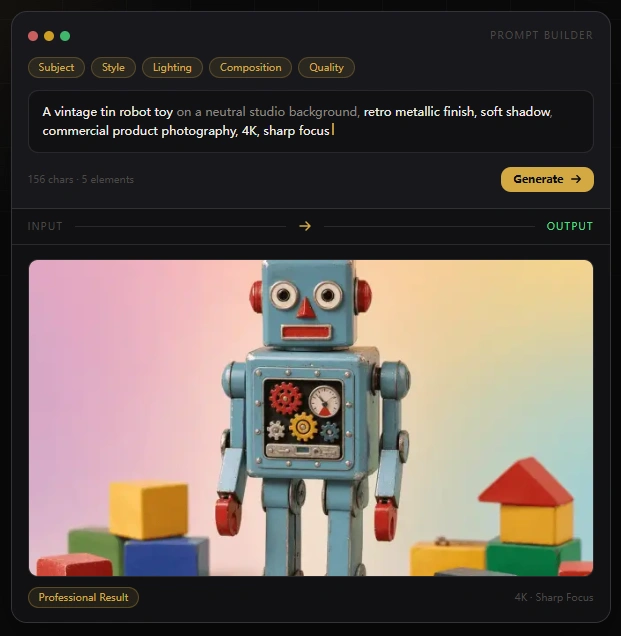
Nail these five pieces and you can describe pretty much any image you want. Every great AI-generated image starts from the same core structure — get these right and your results will speak for themselves.
A dog in a park
A golden retriever sitting in a sunlit park, shallow depth of field, warm afternoon light
A golden retriever sitting in a sunlit park, shallow depth of field, warm afternoon light, bokeh background, photorealistic, 4K, sharp focus, centered composition, professional wildlife photography
The difference between a mediocre and a professional result is often just specificity. Add detail at every element.

Weak
★☆☆☆☆Too vague — no subject detail, no lighting, flat composition

Good
★★★☆☆Better — specific subject, defined lighting, composition hints

Professional
★★★★★Best — full 5-element formula + quality modifiers = studio-grade output
Ready to put this formula to work? Head to Peanut AI text to image — type your prompt, choose a resolution, and download the result in seconds.
What to include in each part of your prompt — and why it matters for your final output.
01 — Subject
Be specific. Name the object, character, or scene. Add attributes: color, texture, size, emotion, action, material.
02 — Style
Define the aesthetic. Reference art movements, photography types, or specific render styles. Peanut AI supports 6+ preset styles and responds well to style keywords in the prompt.
03 — Lighting
Lighting transforms an average image into a compelling one. Specify direction, quality, color temperature, and source.
04 — Composition
Tell Peanut AI where to place the subject and how to frame the shot. This controls visual balance and professional feel.
05 — Quality Modifiers
These keywords signal to the model that you expect professional-grade results. Always include 2–4 at the end of your prompt.
06 — Negative Space
Describe what you don't want. Removing unwanted elements is as important as adding the right ones. Use clear exclusion language.
Copy, adapt, and run these formulas in Peanut AI for immediate professional results.
E-Commerce — Product Photography
The standard for Shopify, Amazon, and catalog listings. Produces studio-quality shots without a photographer.
Formula
[Product] on a clean white background, soft diffused studio lighting, professional product photography, sharp focus, no shadows, centered composition, 4K, no watermark, no text

Example Prompt
A glass perfume bottle on a clean white background, soft diffused studio lighting from camera-left, professional product photography, sharp focus, no shadows, centered composition, 4K
Marketing — Social Media & Ads
Scroll-stopping visuals for Instagram, LinkedIn, and digital ad campaigns.
Formula
Abstract [color palette] background, [geometric/organic shapes], [mood] atmosphere, suitable for [brand type], [style], 16:9 composition, no text, no people

Example Prompt
Abstract gradient from deep navy to electric blue, geometric floating shapes, modern dynamic atmosphere, suitable for tech brand, minimal design, 16:9 composition, no text
Design — Concept Art & Characters
Game assets, book characters, and creative concept exploration.
Formula
[Character description], [art style], [lighting type], [mood/atmosphere], [camera angle], highly detailed, concept art, full body / portrait

Example Prompt
A female warrior in silver armor standing on a mountain peak at sunset, fantasy concept art, dramatic rim lighting, epic cinematic atmosphere, three-quarter view, highly detailed, full body
Architecture — Interior Visualization
Client presentations, design proposals, and spatial exploration without a rendering team.
Formula
[Room type] interior, [design style], [lighting condition], [key materials], [mood], architectural visualization, photorealistic, wide angle lens

Example Prompt
Modern Scandinavian living room interior, warm natural daylight from tall windows, light oak furniture, white walls, cozy minimal atmosphere, architectural visualization, photorealistic, wide angle
Publishing — Book Covers & Illustrations
Generate strong visual directions for cover design proposals quickly.
Formula
[Genre mood] book cover design, [key visual elements], [color palette], [art style], dramatic composition, [lighting], no text, print-ready quality

Example Prompt
Psychological thriller book cover design, silhouette of a figure in an empty corridor, cold blue-grey palette, dark cinematic style, dramatic shadow play, no text, print-ready quality, 4K
Fashion — Editorial & Lookbook
Mock up campaign concepts and editorial spreads before production.
Formula
[Clothing/product description], [setting/background], editorial fashion photography, [lighting style], [mood/season], high fashion, Vogue-style, 4K, sharp

Example Prompt
Flowing silk dress in emerald green, minimalist white studio setting, editorial fashion photography, soft diffused overhead lighting, spring mood, high fashion aesthetic, 4K, sharp focus
For deeper e-commerce prompt coverage, see the AI product photography guide — catalog templates, platform specs, and white-background formulas included.
Generating content for social platforms? The AI social media images guide covers aspect ratios and brand prompt templates for every channel.
Add these keywords to the end of any prompt to consistently push output quality higher. Group them by what aspect of quality you want to improve.
Resolution & Detail
Lighting Quality
Realism & Render
Prestige & Mood
These are the most common prompting errors we see. Each fix takes five seconds and can transform your results.
❌ Weak
A car on a road
✓ Strong
A matte black electric sports car on a rain-slicked empty highway at night, neon city reflections, cinematic lighting, photorealistic, 4K
Add material, color, context, time of day, and atmosphere. Every word of specificity improves accuracy.
❌ Weak
Portrait of a woman, photorealistic
✓ Strong
Portrait of a woman, soft window light from camera-left, warm skin tones, shallow depth of field, Rembrandt lighting, photorealistic, 4K
Lighting is the biggest quality lever in image generation. Always specify source, direction, and quality.
❌ Weak
Anime-style photorealistic watercolor painting, 3D render
✓ Strong
Anime-style portrait, clean line art, vibrant colors, studio ghibli inspired, soft cel shading, 4K
Pick one style category and commit to it. Mixing contradictory styles creates incoherent results.
❌ Weak
A coffee mug, studio lighting, white background, 4K
✓ Strong
A ceramic coffee mug, soft studio lighting, clean white background, no text, no watermark, no props, no shadows, centered, 4K, product photography
For commercial product shots, explicitly exclude text, watermarks, and props to get clean results.
Quick answers on prompt structure, quality modifiers, product photography, and common mistakes.
The best structure uses six elements: Subject, Style, Lighting, Composition, Quality Modifiers, and Negative Space. Combine these in sequence for consistent professional results every time.
Be specific about your subject, define the visual style, specify lighting direction and quality, set the composition, add 2–4 quality modifiers like 4K or photorealistic, and include exclusions like no watermark or no text at the end.
Use resolution modifiers (4K, 8K, sharp focus, highly detailed), lighting modifiers (cinematic lighting, studio lighting, volumetric light), realism modifiers (photorealistic, octane render, ray tracing), and prestige modifiers (award-winning, professional photography, editorial quality).
Use this formula: [Product] on a clean white background, soft diffused studio lighting, professional product photography, sharp focus, no shadows, centered composition, 4K, no watermark, no text. Example: A glass perfume bottle on a clean white background, soft diffused studio lighting from camera-left, professional product photography, sharp focus, no shadows, centered composition, 4K.
Avoid four key mistakes: (1) Being too vague — always specify material, color, context, and time of day. (2) Omitting lighting instructions — always define the light source, direction, and quality. (3) Mixing conflicting style signals — pick one style and commit to it. (4) Forgetting exclusions for product shots — always add no text, no watermark, no props for clean commercial results.
Negative Space refers to the exclusion instructions in your prompt — telling Peanut AI what you don't want in the image. Examples include: no watermark, no text, no people, no props, clean background. This is the sixth element of the six-element prompt formula and is especially important for commercial product photography.
Yes. Peanut AI includes full commercial rights with every generated image. Your prompts are never used for training. No credit card is required to start, and free credits are provided on signup.
These prompts are ready to copy and paste. Sign up free — no card needed, credits are on us.
No credit card required · Prompts never used for training · Full commercial rights